AI Instagram Post Prompts for Small Business Owners

Instagram Post Ideas for Small Business (Photographers edition)
25+ Instagram Post Ideas for Photographers That Book Clients
Reading time: 4 min
Your Instagram feed is full of stunning photos. Your editing is flawless. Your composition makes other photographers envious. But your DMs? Empty. Your booking calendar? Still has gaps.
You're posting consistently, showcasing your best work, using trending audio. Yet the bookings aren't coming. Here's the uncomfortable truth: selling photography services on Instagram is fundamentally harder than selling products. Beautiful portfolio doesn't automatically equal booked calendar—and it's not because your photography isn't good enough.
The problem is strategic, not artistic. Let's fix that.
Why Just Beautiful Photos Aren't Enough
Here's what every photographer needs to understand:
When you sell a product on Instagram:
Someone sees a pretty candle → Likes it → Buys it → Done
Decision is instant, transaction is simple
The photo IS the product
Risk is low ($20-50 impulse buy)
When you sell photography services: Someone sees beautiful photos, but then needs to:
Trust you with irreplaceable moments (wedding, newborn, family milestones)
Imagine themselves in your work ("Will MY photos look like this?")
Understand what they're buying (packages, timeline, deliverables)
Overcome internal fears ("I'm not photogenic," "I'll feel awkward," "What if I don't like them?")
Justify significant investment ($500-5000+, not $30)
Commit to a future date (not instant gratification)
The core challenge: Your Instagram portfolio competes with millions of beautiful photos. Every photographer's feed looks professional. Your potential client is scrolling for inspiration, not actively hiring.
What makes it even harder:
A bride sees 50 wedding photographers with gorgeous portfolios → How does she choose?
A mom sees stunning family photos → But are those families like HERS?
A couple loves your engagement photos → But what's the actual process? What does it cost?
The gap: Beautiful portfolio posts show what you CAN do. They don't show:
That you shoot people who look like THEM
That you handle nervous/awkward clients with ease
What the experience is actually like
Why you're worth the investment
This is why most photographers are stuck posting the same three things: finished photos, behind-the-scenes shots, and camera tips. None of these actually move clients toward booking. Here's what does...
How Clients Actually Use Your Instagram
Most photographers think: "Instagram = my portfolio where clients come to see my work."
Reality: Instagram serves THREE different functions in your client's journey, and you need instagram content ideas for photographers at all three stages.
Stage 1: Discovery & Inspiration
What the client is doing:
Not actively looking for a photographer yet
Searching for: "fall photo outfit ideas," "best locations for engagement photos [city]," "posing tips for couples photos"
Browsing: Pinterest, Instagram Explore, Google
Mindset: "I'm just getting ideas"
What they need from you:
Helpful, educational content that answers their questions
Inspiration that makes them think "I should book a session"
Content that positions you as the helpful expert (so when they're ready, they remember YOU)
The mistake most photographers make: Skipping this stage entirely. Only posting finished work. Assuming people will find you when they're ready to book.
The reality: By the time someone is "ready to book," they're comparing 5-10 photographers they've been following. If you only show up at the decision stage, you're competing cold. TOFU content gets you into their consideration set EARLY.
Stage 2: Portfolio Review
What the client is doing:
Now actively looking for a photographer
Scrolling through your grid intensely
Asking themselves: "Does this photographer shoot people like ME?"
Looking for proof: "Can they handle my specific situation?"
What they're checking:
Do you photograph their age range?
Do you shoot their body type beautifully?
Have you worked in their venue/location?
Do you capture their aesthetic (candid vs posed, moody vs bright)?
Do you shoot their family structure (blended families, LGBTQ+ couples, etc.)?
The mistake most photographers make: Only posting your "best" work (which all looks similar). Not showing the RANGE of clients you serve. Assuming "good photography" is enough.
The reality:
A 45-year-old couple won't book you if your portfolio only shows 25-year-olds
A plus-size bride needs to see you've photographed curves beautifully before
A same-sex couple needs to feel welcomed and celebrated, not just "accepted"
What this means for your content: Your portfolio needs strategic diversity. Every post should answer "Do you work with people like me?"
Stage 3: Trust & Objection Removal
What the client is doing:
Loves your work
Considering booking
But has questions/fears holding them back
The questions in their head they might not ask:
"What if I feel awkward during the session?"
"What's included in the price? Are there hidden fees?"
"How long until I get my photos?"
"What happens if it rains on my session day?"
"I'm not photogenic—will I look good?"
"What's the booking process? What do I need to do?"
The mistake most photographers make: Waiting for clients to DM these questions. Assuming "if they're interested, they'll ask." Losing bookings to photographers who proactively address objections.
The reality: Many potential clients ghost because they're too nervous to ask. Transparency builds trust faster than anything. Answering objections publicly converts lurkers into bookers.
Now that you understand the three stages of your client's journey, here are 25+ post ideas designed to move people through each stage—from stranger to booked client.
25+ Instagram Post Ideas That Turn Photographers Into Businesses
Each post idea includes:
Purpose: What it accomplishes strategically
Format: Grid post, Carousel, Reel, or Story
Funnel stage: TOFU, MOFU, or BOFU
Example: Real-world application
Why it converts: The psychology behind it
Discovery Content: Bring Them In
Goal: Get discovered by people who aren't ready to book yet. Build awareness. Be helpful.
#1: Location Guide Posts
Purpose: Local SEO + removes planning friction + positions as area expert
Format: Carousel with map/photos
Example: "7 hidden photo spots in [city] with parking & best time of day"
Why it converts: Saves/shares = algorithm boost. When they're ready to book, you're the local expert they remember.
#2: "What to Wear" Styling Guides
Purpose: Addresses #1 client stress point before they even book
Format: Carousel with visual examples (real client photos)
Example: "What to wear for fall family photos: 5 outfit formulas that photograph beautifully"
Why it converts: Educational value builds trust. Shows you understand their concerns. Positions you as guide, not just photographer.
#3: Posing Tip Content (For Non-Models)
Purpose: Relieves "I'm not photogenic" fear proactively
Format: Reel showing direction process (before → after with guidance)
Example: "3 poses that make everyone look natural (even if you hate being photographed)"
Why it converts: Proves you can make awkward people look great. Removes psychological barrier to booking.
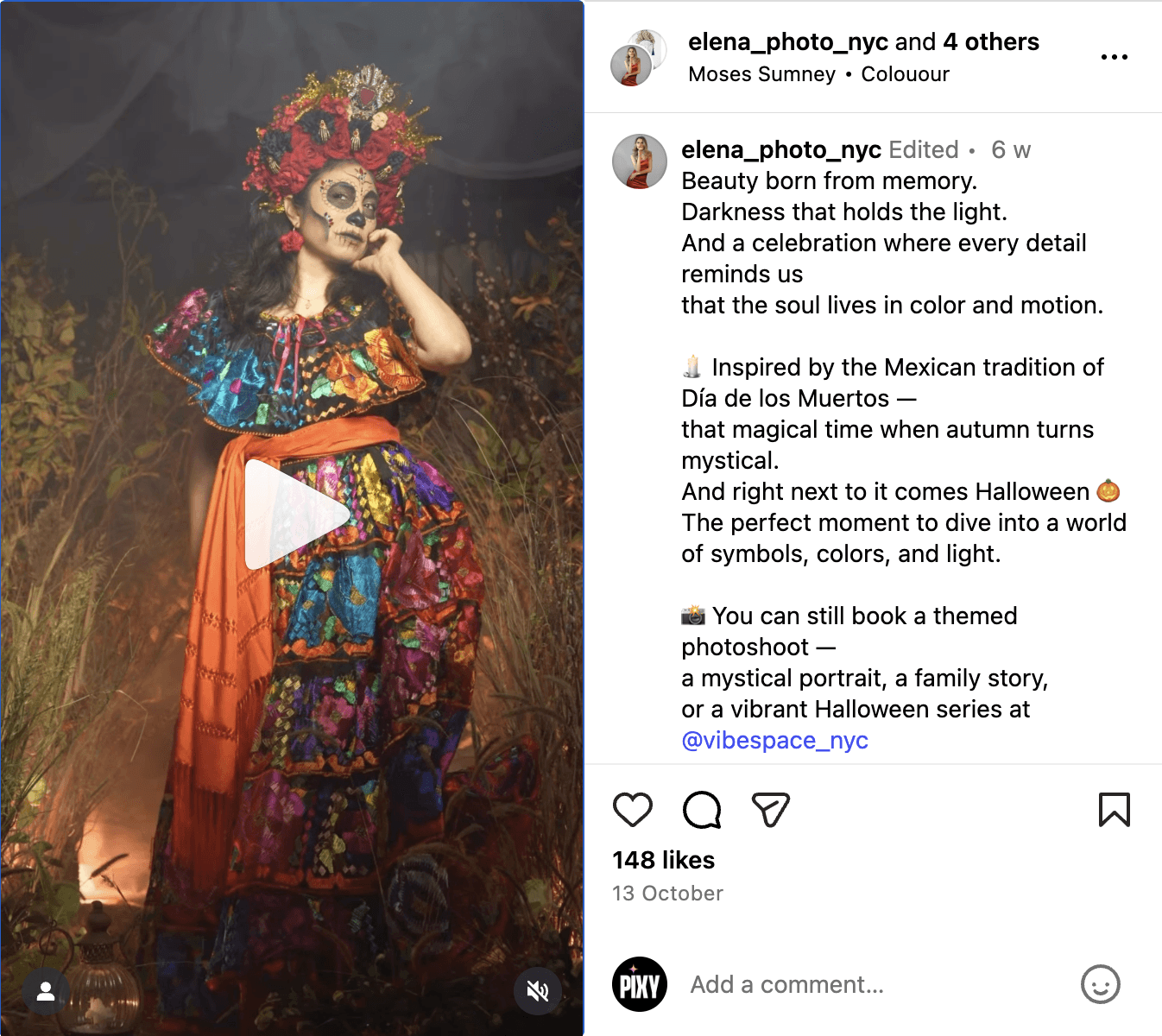
#4: Seasonal Inspiration Posts
Purpose: Creates urgency + plants seed for booking
Format: Inspiration carousel or Reel
Example: "Inspired by the Mexican tradition … and right next to it comes Halloween"
Why it converts: Triggers "I should book a session NOW" thought. Seasonal FOMO.
#5: "Best Time to Book" Educational Posts
Purpose: Educates on lead time needed (especially for holidays, weddings)
Format: Infographic-style carousel or grid post
Example: "When to book family photos for holiday cards (pro tip: August, not November)"
Why it converts: Moves procrastinators to action. Justifies early booking.
#6: Local Recommendations (Non-Photography)
Purpose: Community building + local SEO
Format: Grid post or carousel
Example: "Best family-friendly coffee shops in [neighborhood] (where toddlers are actually welcome)"
Why it converts: Shows you're embedded in the community. Builds rapport beyond transactional relationship.
Portfolio That Says "I Shoot People Like You"
Goal: Help every potential client see themselves in your work. Strategic portfolio curation.
#7: Specific Scenario Showcases
Purpose: Shows you've successfully handled THIS exact situation
Format: Portfolio post with detailed, empathetic caption
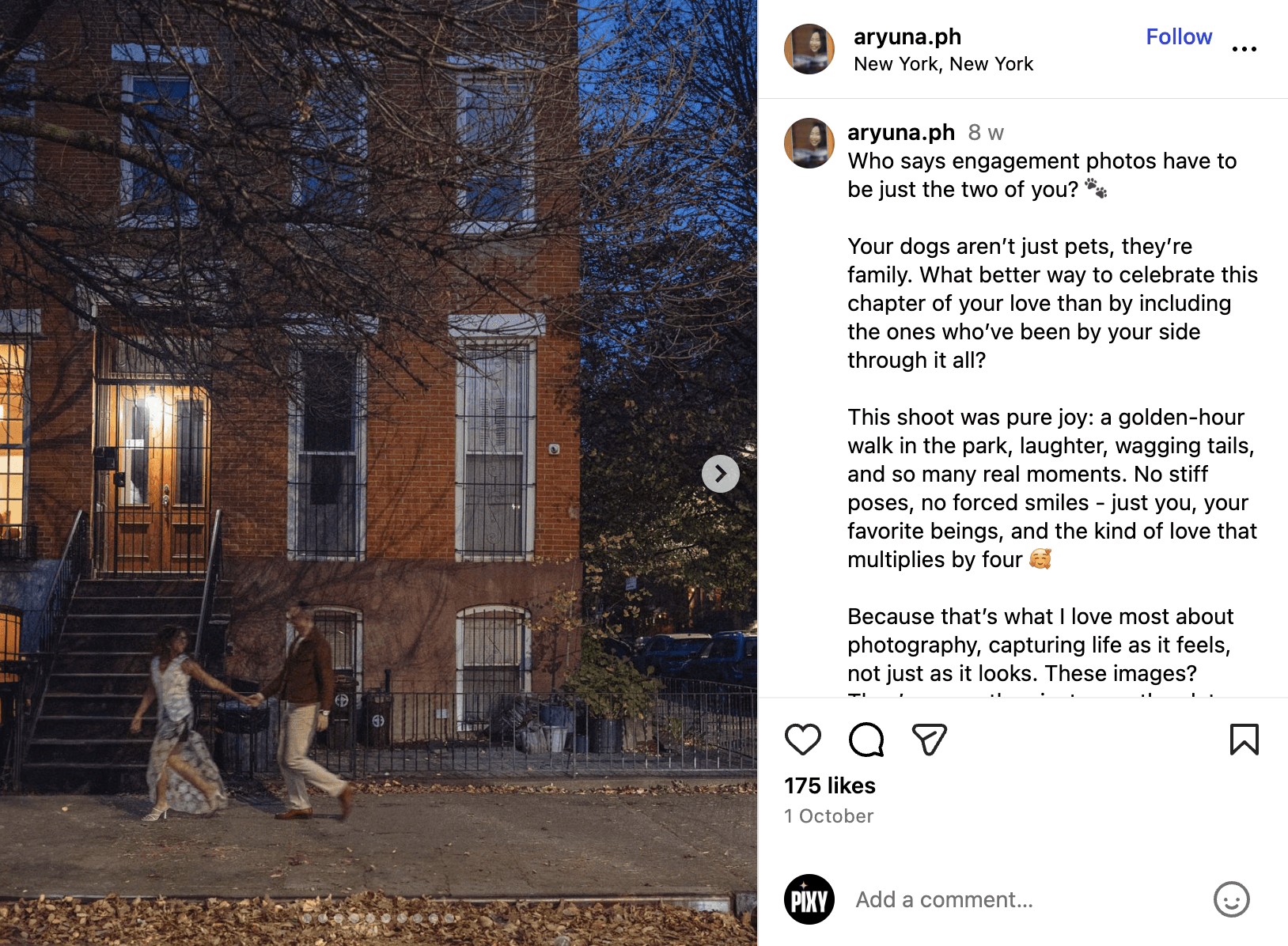
Example: "Who says engagement photos have to be just the two of you?"
Why it converts: Speaks directly to clients with the same fear. Proof you "get it."
#8: Body Diversity Portfolio Posts
Purpose: Shows you photograph ALL bodies beautifully, confidently
Format: Grid post with empowering caption
Example: "Every body is a photo body. Celebrating curves, stretch marks, and real beauty in this engagement session."
Why it converts: Plus-size clients (massive underserved market) often fear photographers won't know how to pose/light them. This post says "I DO."
#9: Age Range Representation
Purpose: Shows you shoot beyond the "Instagram age" (20s-30s)
Format: Portfolio carousel or single post
Example: "Love has no expiration date: Celebrating 50+ couples in engagement photos"
Why it converts: Older clients often feel photography is only for "young beautiful people." Representation = permission to book.
#10: Different Family Structures
Purpose: Inclusive, welcoming representation
Format: Portfolio post with intentional language
Example: "Modern families come in all forms: Blended, single-parent, LGBTQ+, chosen family. I celebrate ALL of you."
Why it converts: Underrepresented families need explicit invitation. "Everyone welcome" is vague. This is specific.
#11: Style Variety Posts (If You Shoot Multiple Styles)
Purpose: Shows range + helps client self-identify their preference
Format: Carousel or post highlighting challenge
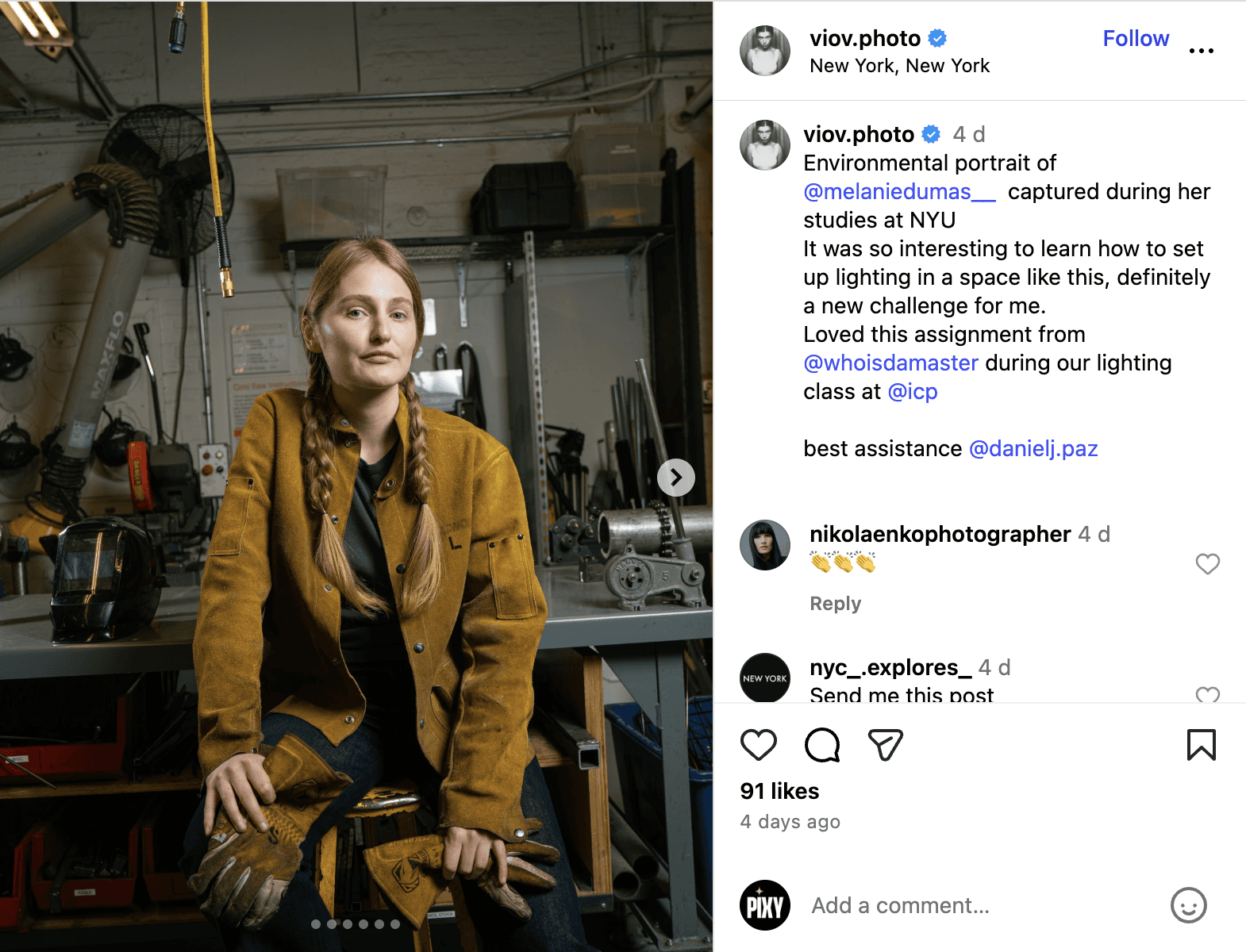
Example: "It was so interesting to learn how to set up lighting a space like this, definitely a new challenge for me"
Why it converts: Helps client articulate what they want. Self-selection improves client-photographer fit.
#12: Location Diversity Posts
Purpose: Shows you're adaptable to different settings
Format: Portfolio carousel
Example: "From urban rooftops to forest trails: Where should we shoot YOUR session?"
Why it converts: Clients with specific location preferences see you can execute their vision.
Trust Builders & Objection Removers - Close Them
Goal: Remove the last barriers between "I love your work" and "I'm ready to book."
#13: "What Happens After You Book" Process Explainer
Purpose: Removes mystery and anxiety about the unknown
Format: Carousel with timeline/checklist visual
Example: "Your photography experience from 'Yes!' to gallery delivery: Here's every step"
Why it converts: Reduces "What am I getting into?" fear. Professionalism signal. Clear expectations.
#14: "I'm Not Photogenic" Myth-Buster Post
Purpose: Addresses THE most common objection
Format: Reel showing transformation (awkward start → directed → beautiful result)
Example: "Watch me direct this 'I hate photos' client into images she's now printing on her wall"
Why it converts: Visual proof you handle nervous clients. Shows your directing skills, not just editing.
#15: Pricing Transparency/Package Breakdown Posts
Purpose: Removes "too scared to inquire" barrier
Format: Carousel or Story highlight
Example: "What's included in my packages (and what's NOT—no hidden fees here)"
Why it converts: Builds trust through honesty. Pre-qualifies leads. Reduces price shock when they inquire.
#16: Weather Contingency/Rescheduling Policy
Purpose: Addresses "what if something goes wrong?" anxiety
Format: Grid post or Story highlight (save to FAQ highlight)
Example: "What happens if it rains on your outdoor session day? Here's my flexible policy"
Why it converts: Shows you've thought through worst-case scenarios. Reduces risk perception.
#17: Turnaround Time & Editing Process Transparency
Purpose: Sets realistic expectations, prevents "Where are my photos?!" frustration
Format: Infographic carousel
Example: "From camera to gallery: Why your photos take 3 weeks (and what's happening behind the scenes)"
Why it converts: Transparency = professionalism. Explains value of editing time.
#18: Client Journey Story (Testimonial Narrative Format)
Purpose: Social proof through transformation story (emotional, not just transactional)
Format: Carousel with client photos + their words
Example: "Meet Emma: From 'I never take professional photos' to proudly displaying her family portraits (her words inside)"
Why it converts: Shows emotional outcome, not just aesthetic outcome. Prospects see themselves in the story.
#19: "Behind the Shot" Problem-Solving Posts
Purpose: Shows expertise through real-world challenges you solved
Format: Before/after Reel or carousel
Example: "How I salvaged this golden hour session when the toddler had a full meltdown (real talk: kids are unpredictable, and I'm prepared)"
Why it converts: Proves you can handle chaos. CRITICAL for family photographers. Parents need to know you won't be flustered.
#20: "Things I'll NEVER Do at Your Session" Values Posts
Purpose: Differentiate through boundaries and standards
Format: Carousel or text-based Reel
Example: "I'll never: Rush your session / Force uncomfortable poses / Make you feel judged / Deliver unedited junk files"
Why it converts: Speaks to what clients DON'T want (often based on bad past experiences). Values-driven positioning.
Engagement & Community Posts (Stay Top of Mind)
Goal: Build relationships beyond transactions. Humanize your brand. Encourage interaction.
#21: Strategic Partner/Venue Collaboration Posts
Purpose: Cross-promotion + borrowed credibility + reach new audiences
Format: Collab post (tag venue/planner/florist)
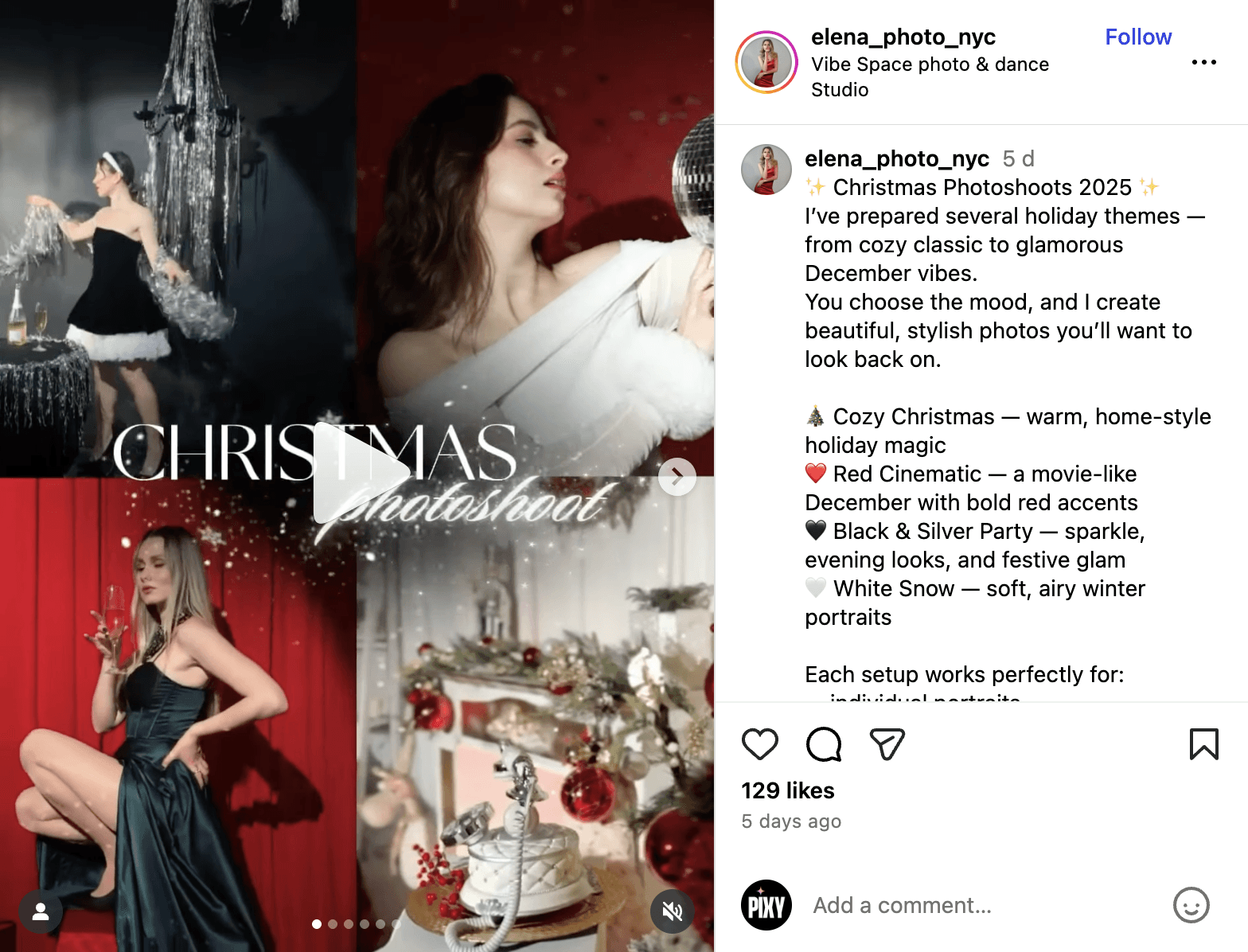
Example: "I've prepared several holiday themes…Each setup works perfectly for…"
Why it converts: Gets you in front of couples already planning events at that venue. Venue tag = endorsement.
#22: "Meet Your Photographer" Personal Story
Purpose: Humanize yourself beyond the camera
Format: Personal portrait + vulnerable, authentic caption
Example: "Why I photograph weddings: The story behind my business (and the wedding that changed everything for me)"
Why it converts: People hire PEOPLE, especially for vulnerable, intimate moments. Connection matters.
#23: Client Celebration/Anniversary Posts
Purpose: Shows you care beyond the transaction. Client retention.
Format: Grid post celebrating past client
Example: "Happy 5th anniversary to the Johnsons! Still one of my favorite couples ever. (PS: Anniversary sessions exist and I LOVE them)"
Why it converts: Makes past clients feel valued → referrals. Shows future clients you build relationships.
#24: Real Client FAQ Posts (Crowdsourced)
Purpose: Address common questions publicly
Format: Carousel answering 3-5 real questions
Example: "Questions I got this week: Do you retouch blemishes? Can we bring props? Do outfits need to match?"
Why it converts: Proves you listen. Answers questions lurkers have but won't ask.
#25: Polls/Interactive Story Content
Purpose: Algorithm boost + audience insight
Format: Instagram Story polls/questions
Example: "Help me decide: Should I offer mini sessions this fall? Vote below" OR "What's your biggest fear about booking a photo session? (Anonymous answers)"
Why it converts: Engagement = visibility. Also gives you content ideas based on real audience concerns.
Quick-Win Seasonal & Timely Posts (Fill Your Calendar)
Goal: Drive immediate action with urgency and scarcity.
#26: Seasonal Booking Reminders
Format: Grid post or Story
Example: "Fall mini-session slots open September 1st—here's what you need to know (and how to snag your spot)"
Why it converts: Creates urgency. Clear CTA.
#27: Last-Minute Availability Posts
Format: Story or grid post
Example: "Surprise opening: Saturday Oct 15th became available due to reschedule. Who wants it? DM to claim."
Why it converts: Scarcity. Impulse bookings.
#28: Holiday Card Deadline Reminders
Format: Grid post or Story (repost multiple times)
Example: "Need photos for holiday cards? Book by October 31st to guarantee delivery before Thanksgiving"
Why it converts: Specific deadline creates urgency. Clear reason to book NOW.
#29: Milestone Session Promotions
Format: Grid post with example photos
Example: "Your baby turns ONE this year? Let's make their cake smash session legendary. Here's what to expect..."
Why it converts: Targets specific life stage. Parents already thinking about first birthday.
#30: Anniversary Session Outreach
Format: Grid post + Story
Example: "Were you married last fall? Celebrate your first anniversary with a couples session (same love, new chapter)"
Why it converts: Targets warm leads (past wedding clients or followers who got married recently).
Format Distribution for Instagram Algorithm:
60% Reels (Instagram heavily prioritizes video in 2024-2025)
30% Carousels (high engagement + saves = algorithm boost)
10% Single image posts (only for timely/urgent announcements)
Posting Cadence Recommendation:
3-4 strategic posts per week > 7 random beautiful photos per week
Balanced mix:
1-2 posts for discovery/education
1 post strategic portfolio diversity
1 post for objection removal/trust builder
Consistency matters more than frequency.
Before You Post Anything: Know Your Photography Positioning
The biggest mistake: Creating content before you know WHO you're for.
Action step: Once you know your positioning, filter every post idea through: "Does this speak to MY ideal client's needs and fears?"
"This Makes Sense, But I'm a Photographer, Not a Content Strategist"
The honest struggle:
You became a photographer for the ART, not the photography business marketing. Your week: 2-5 shoots + 20-40 hours editing + admin + now strategic Instagram content?
Most photographers start strong, then:
Week 1-2: Consistent posting, energized
Week 3: Editing backlog hits, Instagram gets ignored
Week 4: Guilt, scramble to post something, anything
Week 5: Give up, post sporadically when "inspired"
The cycle: Inspiration → consistency → overwhelm → silence → repeat.
The truth successful photographers know: Booked-solid photographers aren't doing this manually anymore. They either:
Hire a social media manager ($500-1500/month) OR
Use AI tools to remove the strategic guesswork OR
Post inconsistently and rely on word-of-mouth (leaving money on the table)
The question: Which path will YOU choose?
Let AI Handle Strategy While You Handle the Camera
Pixy works specifically for photography businesses:
1. Take the 2-minute positioning quiz
Identifies your niche (wedding/family/portrait/commercial)
Understands your style (storytelling/high-end/classic)
Maps your ideal client profile
2. Get a 30-day content strategy tailored to YOUR photography business
Not generic "small business" templates
Content balanced across stages
Seasonal awareness (reminds you to post holiday booking deadlines, etc.)
3. AI generates post variations in your brand voice
Captions, hooks, CTAs pre-written
Instagram-optimized formats (Reels, Carousels, grid posts)
You approve/edit, then schedule
Why photographers love it:
Understands photography business nuances (not generic marketing advice)
Suggests content that actually books clients, not just engagement
Adapts to your shooting schedule (busy season vs slow season awareness)
Removes the "What should I post?" paralysis
Start with your free Instagram profile audit for photographers →
Your Photography Is Beautiful
Your technical skill isn't the problem. Your Instagram strategy just needed to match how clients actually make decisions.
Instagram works for photographers when you:
Understand you're selling a SERVICE (not a product)
Create content for all three stages (discovery, portfolio review, objection removal)
Help clients see THEMSELVES in your work
Post strategically, not just frequently
Stop trying to impress other photographers. Start speaking to the clients who need YOU.
Published Nov 30, 2025
Anna